patient catalogredesign
the opportunity
Fullscript's patient experience was built around practitioner-prescribed treatment plans, a deliberate, high-trust flow. But this model left a massive untapped surface area: the open product catalog that most patients already had access to, but rarely used.
Most patients were passive recipients of care, not active participants in their wellness. The catalog was buried beneath the "My health" landing page, easy to miss entirely. A 90% drop-off rate from catalog view to purchase showed the experience wasn't converting — and converting just 3% of patients that only purchase treatment plans to hybrid users (that not only purchase treatment plans but also self serve from fullscript catalog) represented a significant growth opportunity.
Most patients were passive recipients of care, not active participants in their wellness. The catalog was buried beneath the "My health" landing page, easy to miss entirely. A 90% drop-off rate from catalog view to purchase showed the experience wasn't converting — and converting just 3% of patients that only purchase treatment plans to hybrid users (that not only purchase treatment plans but also self serve from fullscript catalog) represented a significant growth opportunity.
project details
Role: Senior Product Designer
Timeline: Feb - May 2025
Launch: A/B testing for 30 days and released 100% on May 20, 2025.
Timeline: Feb - May 2025
Launch: A/B testing for 30 days and released 100% on May 20, 2025.
process
Before touching any design tool, I spent time building a thorough understanding of the current experience, who it was serving, and where it was breaking down. The design work followed a deliberate sequence of each phase informing the next.
Experience audit
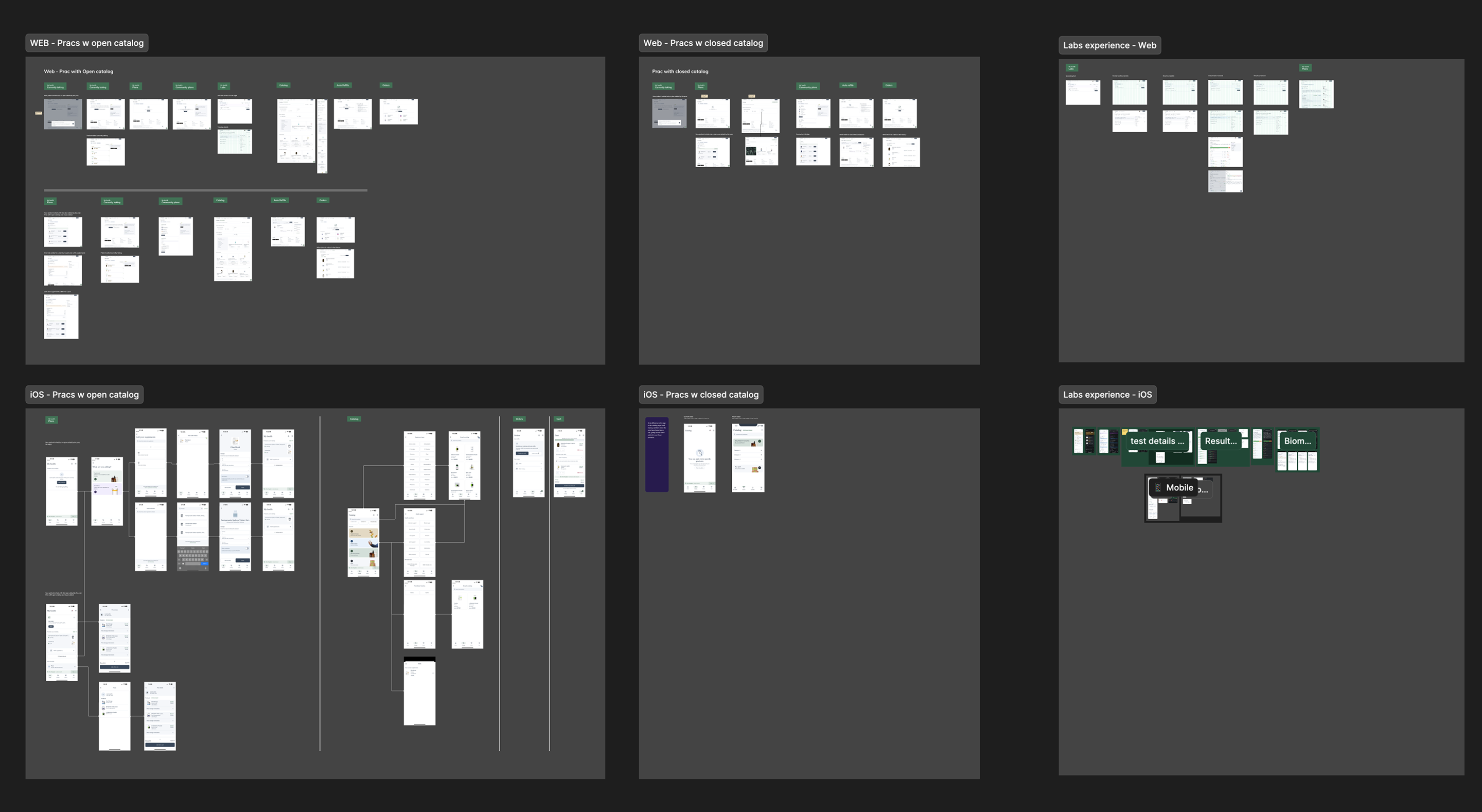
I started by auditing the full current patient experience across web and the iOS app. not just the happy path, but every variation that existed in production. Fullscript's patient population is heterogeneous: some receive treatment plans from practitioners, some use the catalog entirely self-serve, and others have their catalog closed by their practitioner. Each state creates a meaningfully different experience, and I needed to understand all of them before proposing changes.
Patient states mapped:
-Open catalog + plan: Patient has an active Rx and full catalog access;
- Open catalog, no plan: Self-serve patient with no practitioner prescription;
- Closed catalog: Catalog locked by practitioner; plan-only access;
- Public favorites only: Access to practitioner's public storefront, no full catalog;
- Community plans: Access to shared protocols surfaced in the store;
- New vs. returning: Orientation needs differ significantly between these groups.
This mapping surfaced how the "My health" page was doing too many jobs at once (plans, currently taking, community plans, and labs all treated with equal visual weight) and how the catalog tab was positioned as a secondary destination rather than a primary entry point.
Patient states mapped:
-Open catalog + plan: Patient has an active Rx and full catalog access;
- Open catalog, no plan: Self-serve patient with no practitioner prescription;
- Closed catalog: Catalog locked by practitioner; plan-only access;
- Public favorites only: Access to practitioner's public storefront, no full catalog;
- Community plans: Access to shared protocols surfaced in the store;
- New vs. returning: Orientation needs differ significantly between these groups.
This mapping surfaced how the "My health" page was doing too many jobs at once (plans, currently taking, community plans, and labs all treated with equal visual weight) and how the catalog tab was positioned as a secondary destination rather than a primary entry point.
persona research
I studied the existing patient personas to understand the different mindsets, motivations, and needs present in the patient base. The key tension I identified was between provider-loyalists (patients who rely entirely on their practitioner's recommendations) and self-guided adopters who want to take a more active role in their health. A third group, hybrid engaged users, represented the behavior we wanted to cultivate: patients who trust their plans but also explore the catalog independently.
User flows
With the personas defined, I built user flows to trace how each patient type would move through the new experience.
This was especially important because the new catalog-first landing would affect every patient, but in different ways depending on their state. A returning patient with an active plan should see that plan immediately; a new patient with no plan should see an experience that orients and invites exploration.
The flow work also helped surface the edge cases that needed to be scoped — switching between stores, patients with both a plan and public favorites, the iOS experience versus web — and gave the engineering team a shared reference for how states connected.
This was especially important because the new catalog-first landing would affect every patient, but in different ways depending on their state. A returning patient with an active plan should see that plan immediately; a new patient with no plan should see an experience that orients and invites exploration.
The flow work also helped surface the edge cases that needed to be scoped — switching between stores, patients with both a plan and public favorites, the iOS experience versus web — and gave the engineering team a shared reference for how states connected.
Competitive research
Studying catalog experiences inside and outside healthcare
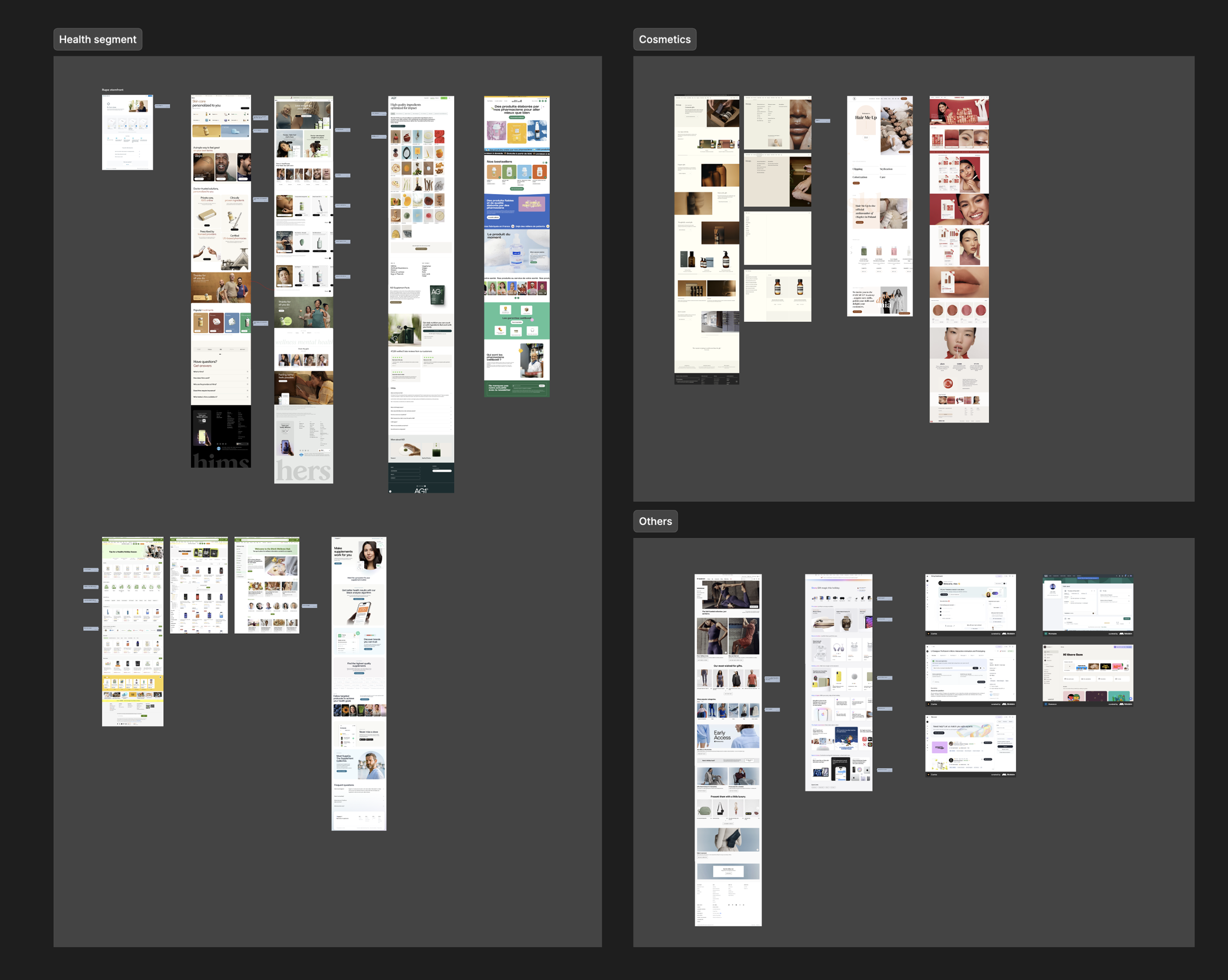
I looked at how other companies handled catalog discovery and browsing both in the healthcare and wellness space, and in adjacent markets like DTC e-commerce, pharmacy platforms, and subscription wellness brands.
Comparables studied: Hims & Hers, Ro (healthcare); Thrive Market, iHerb, Ritual (wellness/DTC); Costco Pharmacy (pharmacy).
Key patterns I brought back: persistent, prominent search as a trust signal; mega menus that flatten category hierarchy; visual curation as a proxy for quality; and the way curated "practitioner picks" or "expert selections" can serve as a trust scaffold for self-guided buying decisions.
I looked at how other companies handled catalog discovery and browsing both in the healthcare and wellness space, and in adjacent markets like DTC e-commerce, pharmacy platforms, and subscription wellness brands.
Comparables studied: Hims & Hers, Ro (healthcare); Thrive Market, iHerb, Ritual (wellness/DTC); Costco Pharmacy (pharmacy).
Key patterns I brought back: persistent, prominent search as a trust signal; mega menus that flatten category hierarchy; visual curation as a proxy for quality; and the way curated "practitioner picks" or "expert selections" can serve as a trust scaffold for self-guided buying decisions.
Wireframing & prototyping
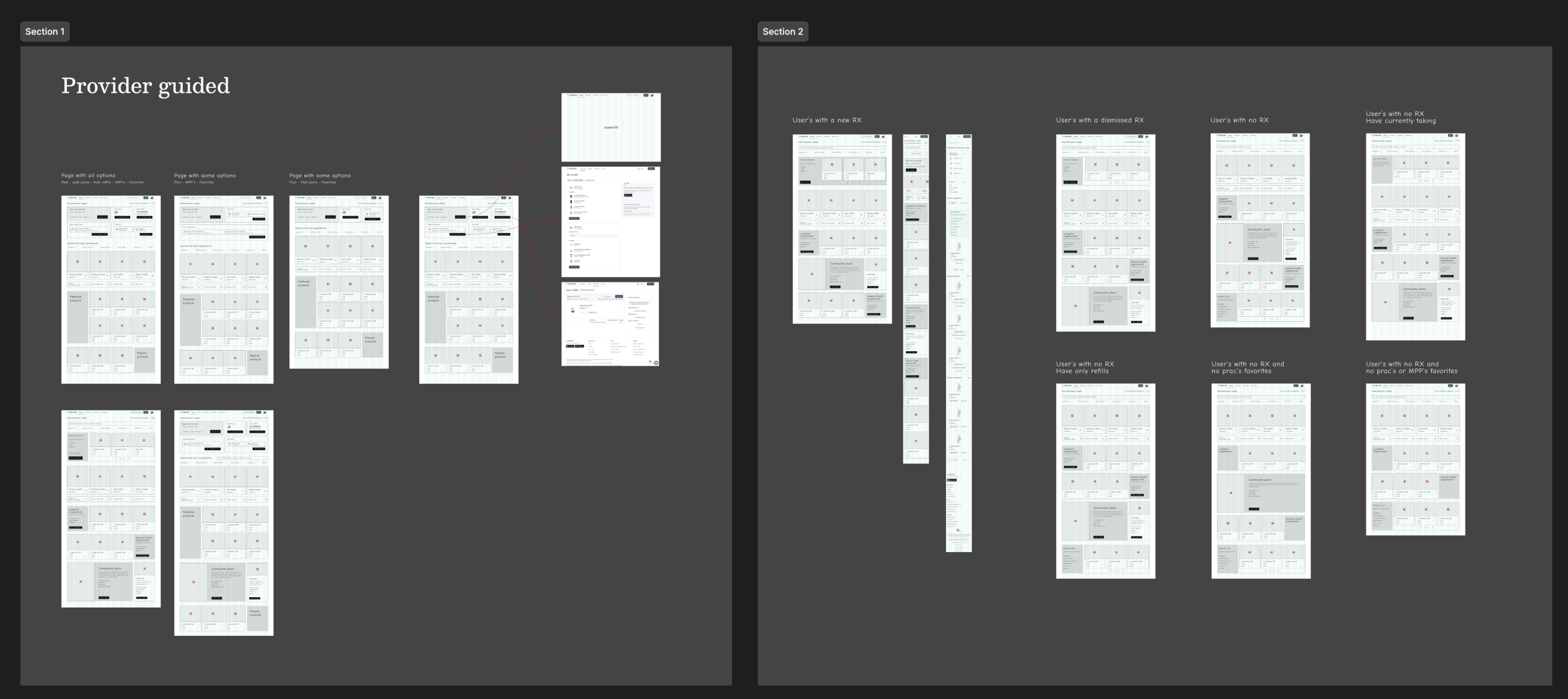
With the research foundation in place, I moved into wireframes and exploring different structural approaches to the catalog-first layout before committing to visual direction.
The central design challenge was how to make the catalog the primary landing experience while keeping treatment plans discoverable and prominent.
Several concepts were explored: a split-panel approach, a card-led hierarchy, and ultimately the layout that won — a full-width catalog page with a persistent plan banner and mega menu at the top.
I built prototypes in Figma to test the information hierarchy and navigation patterns, simulating different patient states (new vs. returning, with plan vs. without) to pressure-test the layout before any UI work began.
The central design challenge was how to make the catalog the primary landing experience while keeping treatment plans discoverable and prominent.
Several concepts were explored: a split-panel approach, a card-led hierarchy, and ultimately the layout that won — a full-width catalog page with a persistent plan banner and mega menu at the top.
I built prototypes in Figma to test the information hierarchy and navigation patterns, simulating different patient states (new vs. returning, with plan vs. without) to pressure-test the layout before any UI work began.
usability testing
We tested the wireframe concepts on UserTesting.com with patients, and ran qualitative interviews with practitioners to understand how they felt about the new approach — particularly the shift away from "My health" as the default and the elevated role of the catalog.
Key findings:
- Patients responded positively to catalog-first — the layout felt more like a shopping experience they were familiar with, without losing the sense of clinical trust.
- The persistent treatment plan banner at the top resolved practitioner concerns about plans being deprioritized — they could see their recommendations were still the first thing patients saw.
- The mega menu was a clear win in testing. Patients who had never found the category navigation before discovered it immediately in the new layout.
- Empty state performance was a gap — new users without any plans or history needed more orientation, which informed an improved empty state experience in the final design.
Key findings:
- Patients responded positively to catalog-first — the layout felt more like a shopping experience they were familiar with, without losing the sense of clinical trust.
- The persistent treatment plan banner at the top resolved practitioner concerns about plans being deprioritized — they could see their recommendations were still the first thing patients saw.
- The mega menu was a clear win in testing. Patients who had never found the category navigation before discovered it immediately in the new layout.
- Empty state performance was a gap — new users without any plans or history needed more orientation, which informed an improved empty state experience in the final design.
ui design
Defining the visual language and new components
With the structure validated, I moved into high-fidelity UI design.
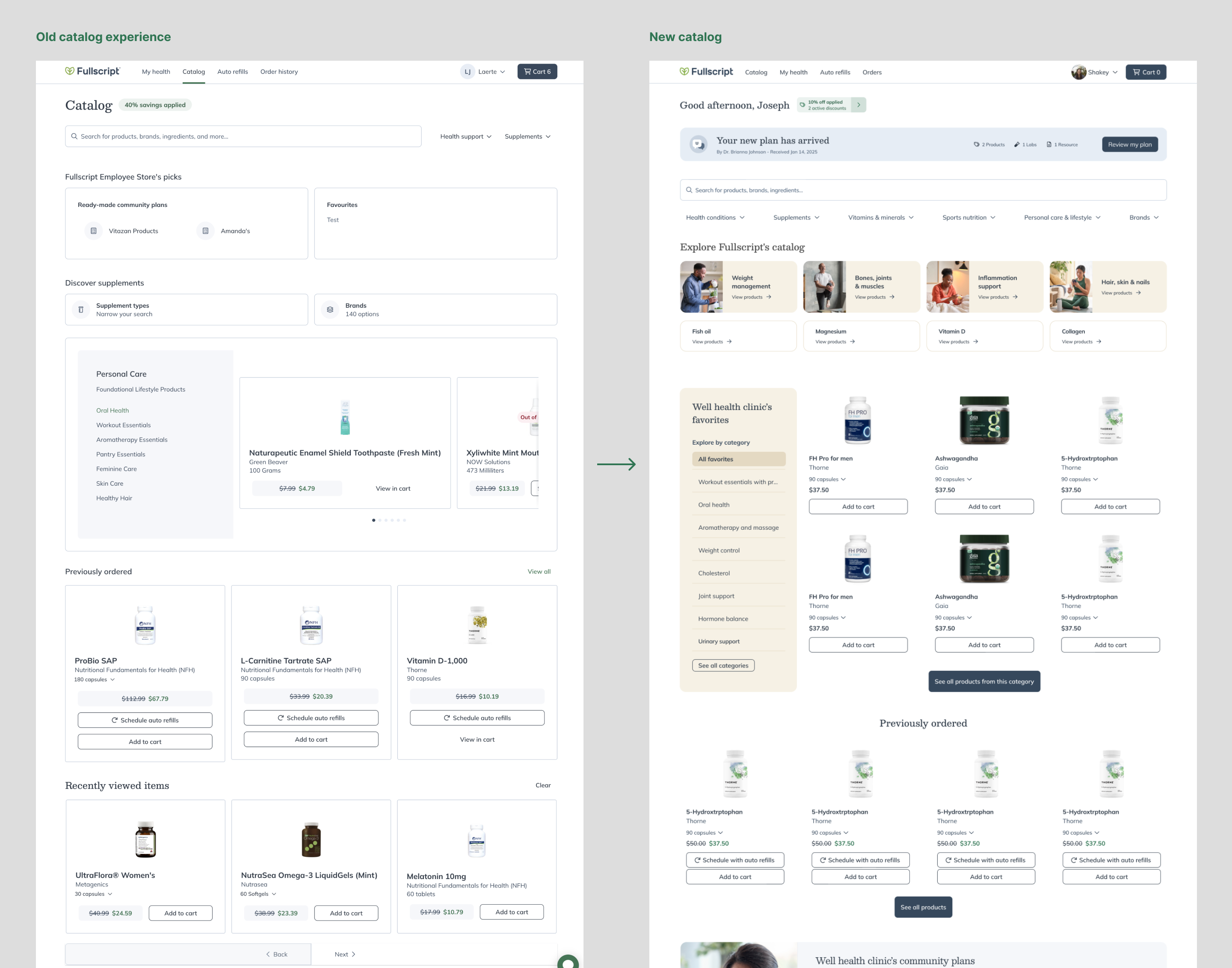
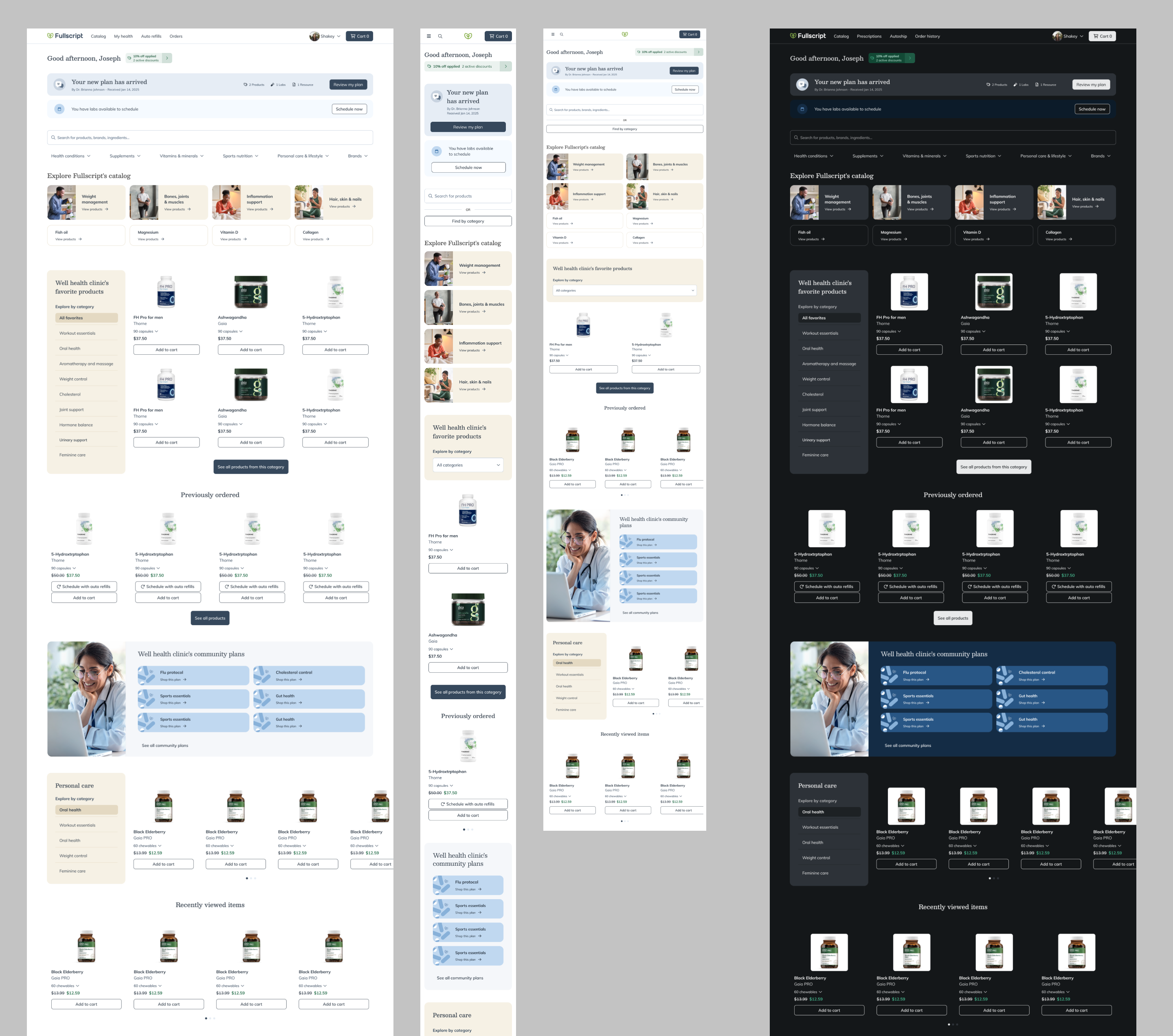
This phase wasn't just applying existing design system components — it required defining net-new components for the catalog experience: the redesigned product spotlight carousel, the practitioner favorites storefront layout, the mega menu structure, and the improved product card with kebab menu preserved.
The visual direction modernized the catalog without departing from Fullscript's established design language — cleaner layouts, stronger imagery usage, and clearer typographic hierarchy.
Every patient state from the original audit was mocked out at high fidelity to ensure no edge case shipped without a defined design — including empty states, closed catalog variants, patients with only public favorites, and the iOS-specific community plans entry point.
With the structure validated, I moved into high-fidelity UI design.
This phase wasn't just applying existing design system components — it required defining net-new components for the catalog experience: the redesigned product spotlight carousel, the practitioner favorites storefront layout, the mega menu structure, and the improved product card with kebab menu preserved.
The visual direction modernized the catalog without departing from Fullscript's established design language — cleaner layouts, stronger imagery usage, and clearer typographic hierarchy.
Every patient state from the original audit was mocked out at high fidelity to ensure no edge case shipped without a defined design — including empty states, closed catalog variants, patients with only public favorites, and the iOS-specific community plans entry point.
key design decisions
The hardest constraint was making the catalog primary without deprioritizing treatment plans.
The solution: land patients on the catalog, but surface the most recently updated plan as a persistent banner at the top. The "golden rule" — plans above all else — was preserved in the new layout, just in a new home.
Mega menu as the primary discovery surface — Rather than relying on patients to scroll or search, the mega menu brought category-level browsing to the top of every page. Informed by competitive research, this was a significant discoverability unlock — confirmed by experiment data showing a massive jump in engagement once it was visible.
Practitioner favorites as a storefront, not a list — Instead of displaying favorites as plain text, I reframed them as curated categories from the practitioner — surfacing category names, enabling filter-by-category, and presenting products with imagery. This gave patients a sense of trusted curation, which aligned with Fullscript's broader value proposition around expert-guided wellness.
iOS scope was intentionally limited — Mobile app behavior differs from web — the app was already more health-management oriented, and "currently taking" was a primary use case there. iOS changes were scoped to community plans as an L1 entry point in the catalog tab only, keeping "My health" as the default on mobile.
The solution: land patients on the catalog, but surface the most recently updated plan as a persistent banner at the top. The "golden rule" — plans above all else — was preserved in the new layout, just in a new home.
Mega menu as the primary discovery surface — Rather than relying on patients to scroll or search, the mega menu brought category-level browsing to the top of every page. Informed by competitive research, this was a significant discoverability unlock — confirmed by experiment data showing a massive jump in engagement once it was visible.
Practitioner favorites as a storefront, not a list — Instead of displaying favorites as plain text, I reframed them as curated categories from the practitioner — surfacing category names, enabling filter-by-category, and presenting products with imagery. This gave patients a sense of trusted curation, which aligned with Fullscript's broader value proposition around expert-guided wellness.
iOS scope was intentionally limited — Mobile app behavior differs from web — the app was already more health-management oriented, and "currently taking" was a primary use case there. iOS changes were scoped to community plans as an L1 entry point in the catalog tab only, keeping "My health" as the default on mobile.
Components deep dives
Each component in the new catalog experience went through its own research and iteration cycle. These weren't just visual decisions. They were product decisions about hierarchy, focus, and what patients actually needed in each moment. Below is a look at one of the most studied components in the project, with more to follow.
Treatment plan received
This was one of the most challenging components to get right, not because it was technically complex, but because it sat at the intersection of two competing priorities. We had just made the catalog the primary landing experience, and now we needed to place a component on that same page that was about something entirely different: a new treatment plan sent by the practitioner.
Getting this wrong in either direction had real consequences. Too prominent, and it would undermine the catalog vision by turning the page back into a plan-centric experience. Too subtle, and we'd risk patients missing a new plan from their practitioner.
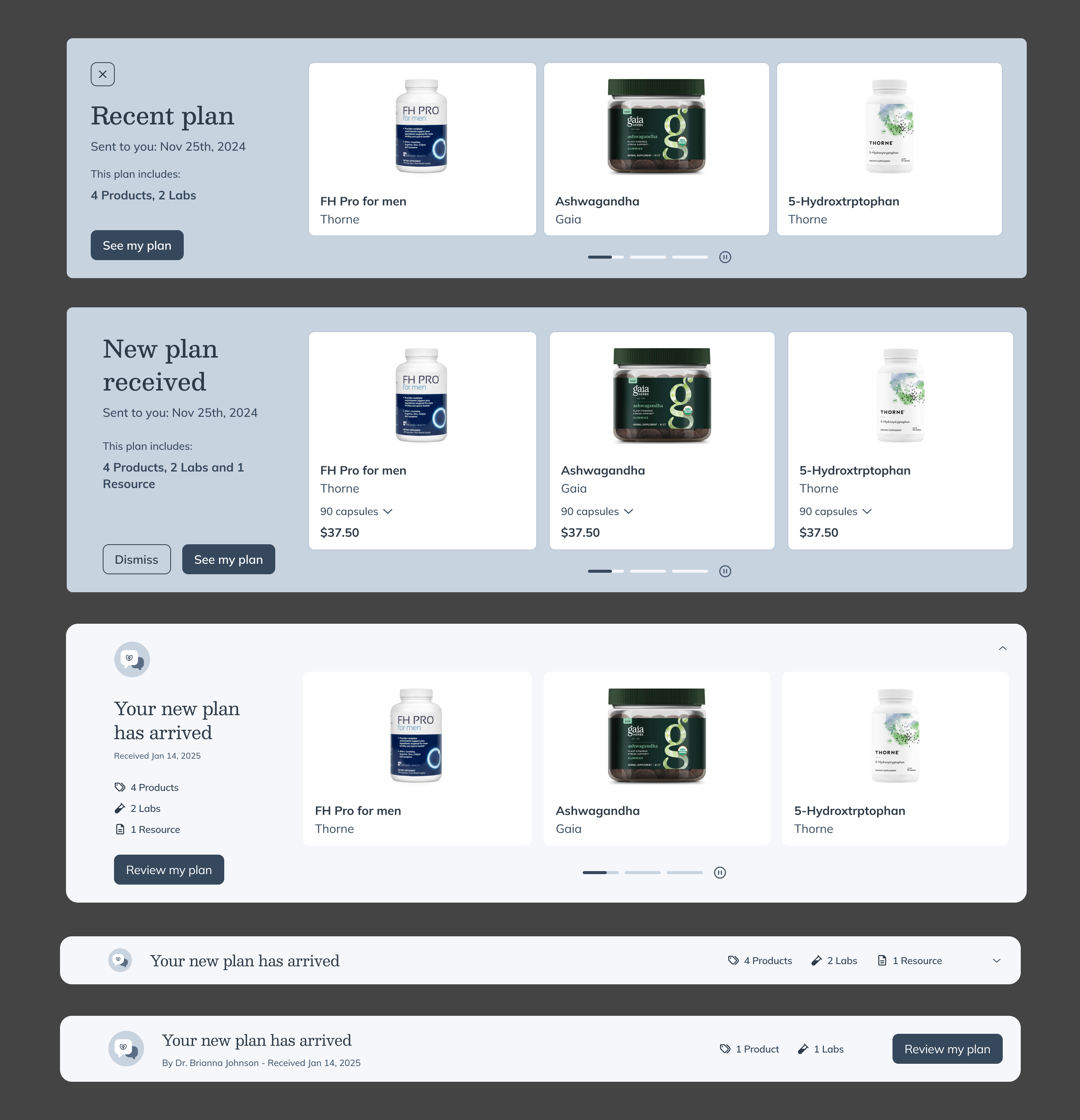
Our first instinct was to show the products inside the plan directly within the component giving patients an immediate preview of what their practitioner had recommended. This felt logical: it made the plan feel tangible and gave patients a reason to act on it immediately.
But as we tested and iterated, a clear problem emerged. The component started growing to accommodate product imagery, names, and details and the more it expanded, the more it pulled attention away from the catalog around it. It also created an inconsistency: when a plan included lab results rather than products, there were no images to show which meant the component looked and behaved differently depending on what was in the plan, creating an unpredictable experience.
After multiple rounds of exploration and testing, I landed on a deliberately restrained approach: a compact banner that communicates the essential information alongside a single clear call to action to review the plan.
This solved both problems at once. The component stayed visually contained, keeping the catalog in focus. And by abstracting away the content (products vs. labs), it worked consistently across every plan type.
Treatment plan received
This was one of the most challenging components to get right, not because it was technically complex, but because it sat at the intersection of two competing priorities. We had just made the catalog the primary landing experience, and now we needed to place a component on that same page that was about something entirely different: a new treatment plan sent by the practitioner.
Getting this wrong in either direction had real consequences. Too prominent, and it would undermine the catalog vision by turning the page back into a plan-centric experience. Too subtle, and we'd risk patients missing a new plan from their practitioner.
Our first instinct was to show the products inside the plan directly within the component giving patients an immediate preview of what their practitioner had recommended. This felt logical: it made the plan feel tangible and gave patients a reason to act on it immediately.
But as we tested and iterated, a clear problem emerged. The component started growing to accommodate product imagery, names, and details and the more it expanded, the more it pulled attention away from the catalog around it. It also created an inconsistency: when a plan included lab results rather than products, there were no images to show which meant the component looked and behaved differently depending on what was in the plan, creating an unpredictable experience.
After multiple rounds of exploration and testing, I landed on a deliberately restrained approach: a compact banner that communicates the essential information alongside a single clear call to action to review the plan.
This solved both problems at once. The component stayed visually contained, keeping the catalog in focus. And by abstracting away the content (products vs. labs), it worked consistently across every plan type.
experiment & rollout
The feature launched as a 50/50 A/B experiment to patients in the US and Canada on April 15, 2025.
During the test we could see $112K total revenue lift in the experiment group — with treatment plan revenue held stable (~$7.9M in both groups). Self-serve and mixed-context revenue grew, proving the uplift added to overall revenue without cannibalizing plan-driven purchases.
Other results in the experiment group:
+338% on mega menu click rate
+7.5% on view catalog > place order
+3.6% lift in hybrid engaged users
+4.3% app downloads
Based on those results we decided to do 100% rollout on May 20, 2025.
During the test we could see $112K total revenue lift in the experiment group — with treatment plan revenue held stable (~$7.9M in both groups). Self-serve and mixed-context revenue grew, proving the uplift added to overall revenue without cannibalizing plan-driven purchases.
Other results in the experiment group:
+338% on mega menu click rate
+7.5% on view catalog > place order
+3.6% lift in hybrid engaged users
+4.3% app downloads
Based on those results we decided to do 100% rollout on May 20, 2025.
long term impact
Beyond the experiment window, the sustained impact became clear in the months following full rollout. Self-serve revenue grew +7.6% from January to April 2026, rising from a weekly average of $2.85M in January to $3.07M in April — an increase of ~$220K per week. This trajectory confirms the catalog uplift didn't just create a short-term engagement spike; it shifted patient behavior durably toward self-serve purchasing.